iOS开发取消UINavigationController返回按钮的问题和自定义按钮颜色
-
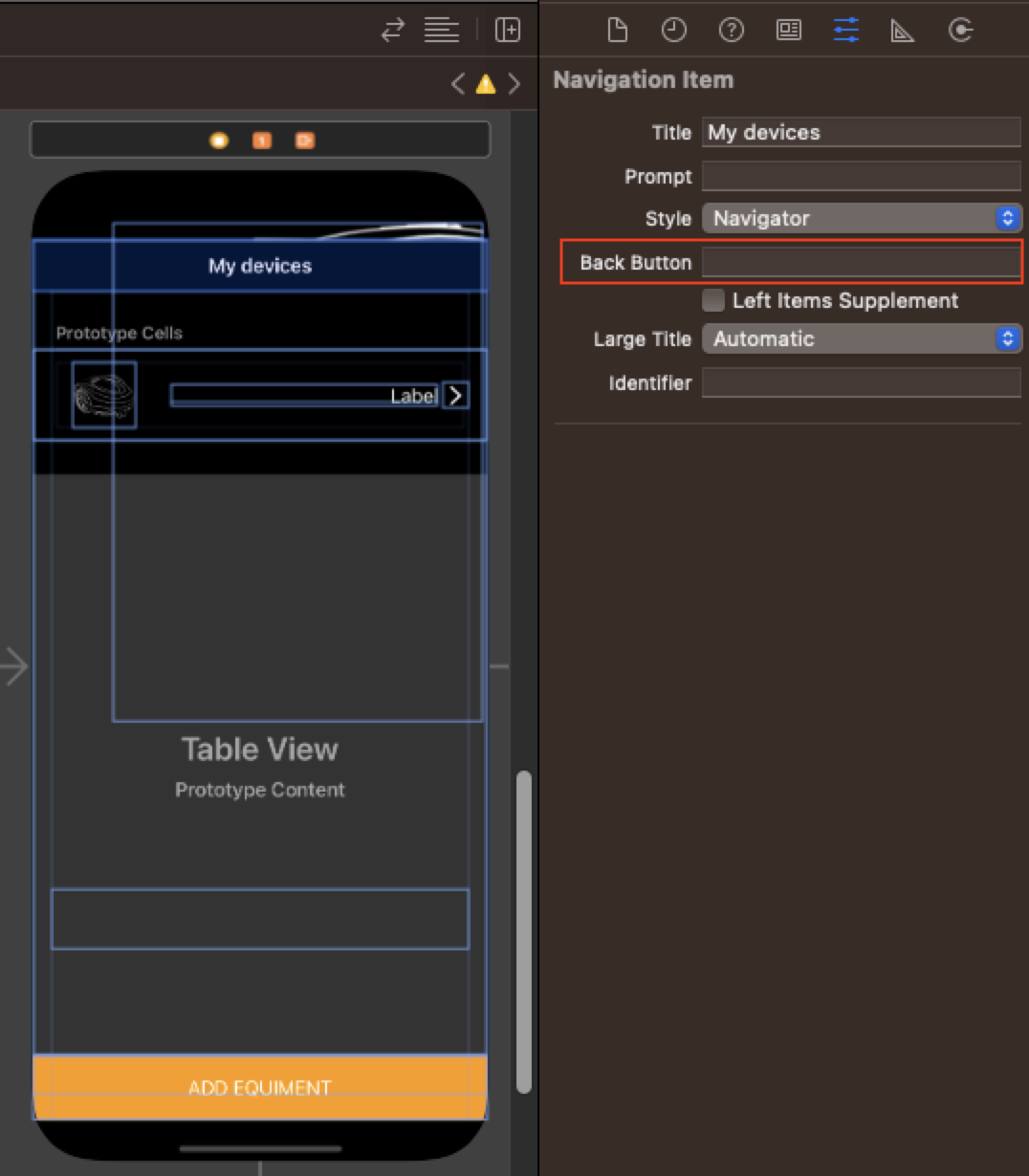
如图修改BackButton属性值给一个空格回车
-
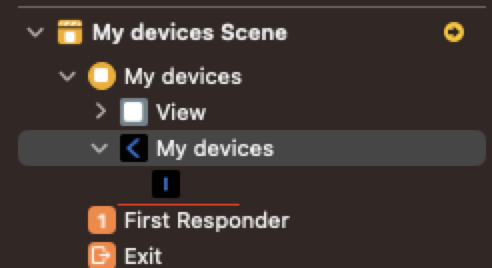
接下来会发现Navigation Item下会有一个新的控件出现,如图
-
选中该组件Bar Button Item,修改相关属性值 其中Tint属性就是修改按钮颜色值
如图修改BackButton属性值给一个空格回车
接下来会发现Navigation Item下会有一个新的控件出现,如图
选中该组件Bar Button Item,修改相关属性值 其中Tint属性就是修改按钮颜色值
if #available(iOS 14, *) {
  print("This code only runs on iOS 14 and up")
} else {
  print("This code only runs on iOS 13 and lower")
}
在 guard 语句中使用 available 属性:
guard #available(iOS 14, *) else {
  print("Returning if iOS 13 or lower")
  return
}@available: 用于标记类或方法的可用性
#available: 用于仅针对特定平台或版本执行一段代码
@available(iOS 15, *)
class App {}
@available(iOS 15, *)
func app() {}

if #available(iOS 15, *) {

}@available(iOS 11, *)
func tableView(_ tableView: UITableView, trailingSwipeActionsConfigurationForRowAt indexPath: IndexPath) -> UISwipeActionsConfiguration? {
let deleteRowAction = UIContextualAction.init(style: UIContextualAction.Style.destructive, title: "DELETE") {(action: UIContextualAction , sourceView: UIView, completionHandle: (Bool) -> Void) in
my_log("delete click")
}
deleteRowAction.image = UIImage(named: "delete")
deleteRowAction.backgroundColor = UIColor(hexString: "FE9B02")
let config = UISwipeActionsConfiguration.init(actions: [deleteRowAction])
return config
}__ANDROID____linux____APPLE__、TARGET_OS_IPHONE、TARGET_IPHONE_SIMULATOR、TARGET_OS_MAC#if defined(WIN32) || defined(_WIN32) || defined(_WIN32_) || defined(WIN64) || defined(_WIN64) || defined(_WIN64_)
#define OS_WINDOWS 1
#elif defined(ANDROID) || defined(__ANDROID__)
#define OS_ANDROID 1
#elif defined(__linux__)
#define OS_LINUX 1
#elif defined(__APPLE__) || defined(TARGET_OS_IPHONE) || defined(TARGET_IPHONE_SIMULATOR) || defined(TARGET_OS_MAC)
#define OS_IOS 1
#else
#define OS_UNKNOWN 1
#endifC:\Users\用户名\AppData \Roaming, 通过环境变量%AppData%可以访问,这里用来存放当前登录用户所产生的数据, 对其他的用户不可见。如果你在公司网络,加入了域,这个文件夹会通过网路同步, 让你的数据在不同的计算机上漫游。该目录常被滥用。
C:\Users\用户名\AppData \Local, 通过环境变量%LocalAppData%可以访问, 这个目录和上面的基本- -样,不过仅限本地,加入了域也不会同步。 -般情况下,如果不加入域,Roaming和Local并没有什么区别, 但是需要网络同步的时候,尽量把不必要的数据留在本地。 个人使用的软件可以装在C:\Users\用户名\AppData\Local/\Programs下面。
C:\ProgramData, 和AppData的区别在于,这里存放的数据是公用的, 如果你希望软件的数据在所有的用户之间保持一致, 那么程序生成的数据应当存放在这里。
/Users/用户名/Library/Application Support
useradd -d /home/test -m testuseradd:创建新用户
passwd test会提示你输入两次密码
userdel test输出信息包括 用户名,终端类型,登录日期,访问IP -H 打印列标题 -b 查看上次启动时间
who [-H|-b]
who [-H|-b] /var/log/wtmp选项:
查看所有用户最近一次登录历史
命令将读取/var/log/lastlog文件;用户排列顺序按照/etc/passwd中的顺序
选项:
根据/var/log/wtmp文件中的登陆和退出时间报告用户连接的时间(小时),默认输出报告总时间
apt-get install supervisorsupervisor配置文件:/etc/supervisor/supervisord.conf 子进程配置文件路径:/etc/supervisor/conf.d/
# 查看所有进程的状态
supervisorctl status
# 停止iot
supervisorctl stop iot
# 启动iot
supervisorctl start iot
# 重启iot
supervisorctl restart iot
# 配置文件修改后使用该命令加载新的配置
supervisorctl update
# 重新启动配置中的所有程序
supervisorctl reload[program:iot]
# 脚本目录
directory=/opt/iot
# 脚本执行命令
command=/opt/iot/main
# 日志输出
stdout_logfile=/opt/iot/supervisor/main.log
# supervisor启动的时候是否随着同时启动,默认True
autostart=true
autorestart=true
startsecs=5
priority=1
stopasgroup=true
killasgroup=true问题描述:安装好supervisor没有开启服务直接使用supervisorctl报的错
解决办法:supervisord -c /etc/supervisord.conf
问题描述:command中启动方式为后台启动,导致识别不到pid,然后不断重启,这里使用的是elasticsearch,command指定的是$path/bin/elasticsearch -d
解决办法:supervisor无法检测后台启动进程的pid,而supervisor本身就是后台启动守护进程,因此不用担心这个
问题描述:在运行supervisord -c /etc/supervisord.conf之前,直接运行过supervisord -c /etc/supervisord.d/xx.conf导致有些进程被多个superviord管理,无法正常关闭进程。
解决办法:使用ps -fe | grep supervisord查看所有启动过的supervisord服务,kill相关的进程。
$ brew install hugo$ hugo new site myblog$ cd themes
$ git clone https://github.com/de-souza/hugo-flex.git$ hugo new post/config.mdhugo server -D --theme=hugo-flex --buildDraftshugo --theme=hugo-flex --baseURL="https://blog.ttbt.work" --buildDrafts
hugo --theme=hugo-flex --baseUrl="https://codebeautiful.gitee.io" --buildDrafts