Spring boot 实现定时任务

  1. 主类添加@EnableScheduling注解
  2. 实现类添加@Component
  3. 具体方法添加@Scheduled
@EnableScheduling
@SpringBootApplication
public class SpringBootApplication {

    public static void main(String[] args) {
        SpringApplication.run(SpringBootApplication.class);
    }
}

@Component
public class ScheduledTask {

    @Scheduled(cron = "0 * * * * ?")
    public void run() {
        System.out.println("现在时间:" + dateFormat.format(new Date()));
    }
}

Cron表达式在线生成工具

Golang_解析hugo生成的sitemap提交百度搜索

package main

import (
	"encoding/hex"
	"encoding/xml"
	"fmt"
	"os"
	"strings"
	"testing"
)

type Node struct {
	Loc string `xml:"loc"`
}

type Root struct {
	XMLName xml.Name `xml:"urlset"`
	Nodes   []Node   `xml:"url"`
}

func main() {
	file, err := os.Open("../public/sitemap.xml")
	if err != nil {
		panic(err)
	}
	defer file.Close()

	var root Root
	decoder := xml.NewDecoder(file)
	if err := decoder.Decode(&root); err != nil {
		panic(err)
	}

	for _, node := range root.Nodes {
		fmt.Println(node.Loc)
	}
}

以下是sitemap.xml的文件获取路径

https://codebeautiful.gitee.io/sitemap.xml

Qt开发https请求报 qt.tlsbackend.ossl: Failed to load libssl/libcrypto.

使用环境是 macOS13 Qt Creator版本是9.0

错误原因分析:未导入 ssl 和 crypto 相关库

解决方法:在 .pro 文件中加入一下代码

LIBS += -lssl
LIBS += -lcrypto

LIBS    += -L"/opt/homebrew/Cellar/openssl@1.1/1.1.1s/lib"
INCLUDEPATH += /opt/homebrew/Cellar/openssl@1.1/1.1.1s/include

其中openssl的路径依据安装路径不同存在不一致的情况,我自己的openssl是通过 brew install openssl 如果是M系列可能需要使用 arch -arm64 brew install openssl

Swift Notification使用

简单使用记录

//注册监听
var observer = NotificationCenter.default.addObserver(forName: Notification.Name(rawValue: "Notify"), object: nil, queue: OperationQueue.main) {_ in
        }
//移除监听
NotificationCenter.default.removeObserver(observer)
//发送通知
NotificationCenter.default.post(name: Notification.Name("Notify"), object: nil)

Spring boot Data JPA注解使用教程

注解 说明 详情
@Entity
@Table
@Id
@GeneratedValue
@Basic
@Column @Column(name=“name”, nullable=false)
@Transient
@Temporal
@Enumerated
@Embedded
@Embeddable
@ElementCollection
@CreatedDate
@CreatedBy
@LastModifiedDate
@LastModifiedBy
@MappedSuperclass

多表设计注解

注解 说明 详情
@OneToOne 在单向关系中, 用于关系的发起者
@OneToMany
@ManyToMany

参数校验注解

注解 作用类型 说明
@Null 任何类型 属性必须为null
@NotNull 任何类型 属性不能为null
@NotEmpty 集合 集合不能为null,且size大于0
@NotBlank 字符串、字符 字符类不能为null,且去掉空格之后长度大于0
@AssertTrue Boolean、boolean 布尔属性必须是true
@Min 数字类型 限定数字的最小值(整型)
@Max 同@Min 限定数字的最大值(整型)
@DecimalMin 同@Min 限定数字的最小值(字符串,可以是小数)
@DecimalMax 同@Min 限定数字的最大值(字符串,可以是小数)
@Range 数字类型 限定数字范围(长整型)
@Length(min=,max=) 字符串 限定字符串长度
@Size 集合 限定集合大小
@Past 时间、日期 必须是一个过去的时间或日期
@Future 时期、时间 必须是一个未来的时间或日期
@Email 字符串 必须是一个邮箱格式
@Pattern 字符串、字符 正则匹配字符串

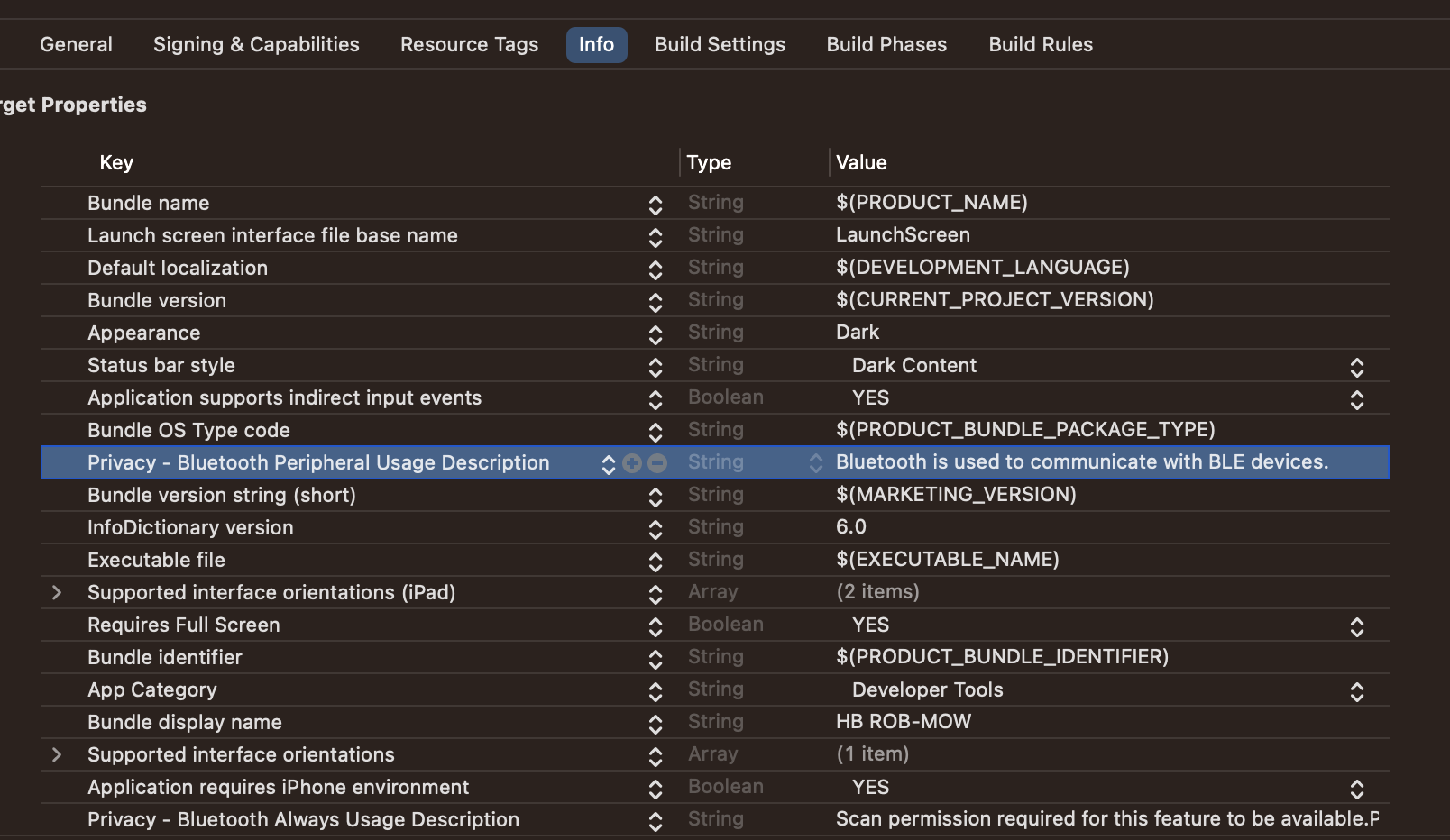
iOS上架ipa,解决蓝牙权限申请问题

收到错误的邮件信息

ITMS-90683: Missing purpose string in Info.plist - Your app’s code references one or more APIs that access sensitive user data, or the app has one or more entitlements that permit such access. The Info.plist file for the “iosApp.app” bundle should contain a NSBluetoothPeripheralUsageDescription key with a user-facing purpose string explaining clearly and completely why your app needs the data. If you’re using external libraries or SDKs, they may reference APIs that require a purpose string. While your app might not use these APIs, a purpose string is still required. For details, visit:

<key>NSBluetoothPeripheralUsageDescription</key>
<string>Bluetooth is used to communicate with BLE devices.</string>

image-20230425210600856

iOS navigationController 跳转页面不销毁对象,退出销毁对象

需求分析

  1. 进入界面开启蓝牙连接
  2. 中间有跳转其他页面,需要再其他页面保持蓝牙连接状态
  3. 退出界面后需要断开蓝牙连接

解决办法

在viewDidDisappear中处理连接断开问题

在该方法中,如果是跳转界面self.navigationController不为空,如果退出当前界面得到的值为nil

override func viewDidDisappear(_ animated: Bool) {
    if self.navigationController == nil {
    		// todo 调用蓝牙断开方法
    }
}

小米xmodem协议crc32 crc16 crc8 使用

crc8校验

#include <stdint.h>
uint8_t crc8(uint8_t *p_buffer, uint16_t buf_size);
uint8_t crc8(uint8_t *p_buffer, uint16_t buf_size)
{
    uint8_t crc = 0;
    uint8_t i=0;
    if(buf_size <= 0)
    {
        return crc;
    }
    while( buf_size-- )
    {
        for (  i = 0x80; i != 0; i /= 2 )
        {
            if ( (crc & 0x80) != 0)
            {
                crc *= 2;
                crc ^= 0x07;
            }
            else
            {
                crc *= 2;
            }

            if ( (*p_buffer & i) != 0 )
            {
                crc ^= 0x07;
            }
        }
        p_buffer++;
    }
    return crc;
}

crc16

/* CRC16 implementation acording to CCITT standards */
unsigned short crc16_ccitt_check(const void *buf, int len);
static const unsigned short crc16tab[256]= {
	0x0000,0x1021,0x2042,0x3063,0x4084,0x50a5,0x60c6,0x70e7,
	0x8108,0x9129,0xa14a,0xb16b,0xc18c,0xd1ad,0xe1ce,0xf1ef,
	0x1231,0x0210,0x3273,0x2252,0x52b5,0x4294,0x72f7,0x62d6,
	0x9339,0x8318,0xb37b,0xa35a,0xd3bd,0xc39c,0xf3ff,0xe3de,
	0x2462,0x3443,0x0420,0x1401,0x64e6,0x74c7,0x44a4,0x5485,
	0xa56a,0xb54b,0x8528,0x9509,0xe5ee,0xf5cf,0xc5ac,0xd58d,
	0x3653,0x2672,0x1611,0x0630,0x76d7,0x66f6,0x5695,0x46b4,
	0xb75b,0xa77a,0x9719,0x8738,0xf7df,0xe7fe,0xd79d,0xc7bc,
	0x48c4,0x58e5,0x6886,0x78a7,0x0840,0x1861,0x2802,0x3823,
	0xc9cc,0xd9ed,0xe98e,0xf9af,0x8948,0x9969,0xa90a,0xb92b,
	0x5af5,0x4ad4,0x7ab7,0x6a96,0x1a71,0x0a50,0x3a33,0x2a12,
	0xdbfd,0xcbdc,0xfbbf,0xeb9e,0x9b79,0x8b58,0xbb3b,0xab1a,
	0x6ca6,0x7c87,0x4ce4,0x5cc5,0x2c22,0x3c03,0x0c60,0x1c41,
	0xedae,0xfd8f,0xcdec,0xddcd,0xad2a,0xbd0b,0x8d68,0x9d49,
	0x7e97,0x6eb6,0x5ed5,0x4ef4,0x3e13,0x2e32,0x1e51,0x0e70,
	0xff9f,0xefbe,0xdfdd,0xcffc,0xbf1b,0xaf3a,0x9f59,0x8f78,
	0x9188,0x81a9,0xb1ca,0xa1eb,0xd10c,0xc12d,0xf14e,0xe16f,
	0x1080,0x00a1,0x30c2,0x20e3,0x5004,0x4025,0x7046,0x6067,
	0x83b9,0x9398,0xa3fb,0xb3da,0xc33d,0xd31c,0xe37f,0xf35e,
	0x02b1,0x1290,0x22f3,0x32d2,0x4235,0x5214,0x6277,0x7256,
	0xb5ea,0xa5cb,0x95a8,0x8589,0xf56e,0xe54f,0xd52c,0xc50d,
	0x34e2,0x24c3,0x14a0,0x0481,0x7466,0x6447,0x5424,0x4405,
	0xa7db,0xb7fa,0x8799,0x97b8,0xe75f,0xf77e,0xc71d,0xd73c,
	0x26d3,0x36f2,0x0691,0x16b0,0x6657,0x7676,0x4615,0x5634,
	0xd94c,0xc96d,0xf90e,0xe92f,0x99c8,0x89e9,0xb98a,0xa9ab,
	0x5844,0x4865,0x7806,0x6827,0x18c0,0x08e1,0x3882,0x28a3,
	0xcb7d,0xdb5c,0xeb3f,0xfb1e,0x8bf9,0x9bd8,0xabbb,0xbb9a,
	0x4a75,0x5a54,0x6a37,0x7a16,0x0af1,0x1ad0,0x2ab3,0x3a92,
	0xfd2e,0xed0f,0xdd6c,0xcd4d,0xbdaa,0xad8b,0x9de8,0x8dc9,
	0x7c26,0x6c07,0x5c64,0x4c45,0x3ca2,0x2c83,0x1ce0,0x0cc1,
	0xef1f,0xff3e,0xcf5d,0xdf7c,0xaf9b,0xbfba,0x8fd9,0x9ff8,
	0x6e17,0x7e36,0x4e55,0x5e74,0x2e93,0x3eb2,0x0ed1,0x1ef0
};
  
unsigned short crc16_ccitt_check(const void *buf, int len)
{
	register int counter;
	register unsigned short crc = 0;
	unsigned char * data = (unsigned char *)buf;
	for( counter = 0; counter < len; counter++)
		crc = (crc<<8) ^ crc16tab[((crc>>8) ^ *data++) & 0x00FF];
	return crc;
}
crc32

#include <stdio.h>
#include <stdint.h>

uint32_t soft_crc32(const void *__data, int data_size, uint32_t crc);
void soft_crc32_init(void);


#define TABLE_SIZE 256

static uint32_t crc_table[TABLE_SIZE];
static const unsigned int rcrc32 = 0xEDB88320;

void soft_crc32_init(void)
{
	unsigned int crc = 0;
	unsigned char i;
	unsigned int j;

	for (j = 0; j < TABLE_SIZE; j++) {
		crc = 0;
		for (i = 0x01; i != 0x00; i <<= 1) {
			if ((crc & 0x00000001) != 0) {
				crc >>= 1;
				crc ^= rcrc32;
			} else {
				crc >>= 1;
			}
			if ((j & i) != 0)
				crc ^= rcrc32;
		}
		crc_table[j] = crc;
		//printf("%08x\r\n", crc);
	}
}

uint32_t soft_crc32(const void *__data, int data_size, uint32_t crc)
{
	const uint8_t *data =(const uint8_t *) __data;
	unsigned int result = crc;
	unsigned char crc_H8;
	soft_crc32_init();
	//printf("soft_crc32 data_size= %d\r\n", data_size);
	while (data_size--) {
		crc_H8 = (unsigned char)(result & 0x000000FF);
		result >>= 8;
		result ^= crc_table[crc_H8 ^ (*data)];
		data++;
	}

	return result;
}

Switch使用for forEach map

区间用法

区间运算符 (… 和 ..<) ,分别表示

0 … 3 表示 [0,1,2,3],数学表达式[0,3]

0 ..< 3 表示[0,1,2],数学表达式[0,3)

代码如下

for i in 0 ... 3 {
  print(i)// 0,1,2,3
}
for i in 0 ..< 3 {
  print(i)// 0,1,2
}
// 倒序遍历
for i in (0...3).reversed() {
  print(i)// 3,2,1,0
}
// 条件遍历
for i in 0...3 where i % 2 == 0 {
  print(i)// 0,2
}

数组遍历方法

let arr = [1,2,3]
// 元素遍历
for a in arr {
    print(a)
}
// 索引遍历
for i in 0..<arr.count {
    print(arr[i])
}
// forEach
arr.forEach { a in
    print(a)
}
// 迭代器遍历
for (index, element) in arr.enumerated() {
    print(index, element)// 0 1, 1 2, 2 3
}

Kotlin Native 开发 NSData转ByteArray

String转NSData

val nsdata = ("Hello" as NSString).dataUsingEncoding(NSUTF8StringEncoding)

val hello = "Hello"
NSData.create(bytes = hello.cstr.ptr, length = hello.length)

NSData转ByteArray

// 实现1
if (nsdata != null) {
    val byteArray = ByteArray(nsdata.length.toInt())
    byteArray.usePinned {
        memcpy(it.addressOf(0), nsdata.bytes, nsdata.length)
    }
}
// 实现2
val byteArray = ByteArray(data.length.toInt())
byteArray.apply {
  usePinned {
  		memcpy(it.addressOf(0), data.bytes, data.length)
	}
}
// 实现3
val byteArray = data.bytes?.readBytes(data.length.toInt())

ByteArray 转 NSData

var nsdata: NSData
byteArray?.usePinned {
    nsdata = NSData.dataWithBytes(it.addressOf(0), it.get().size.toULong())
}